Cleaning timesheets that are right before they reach payroll
RotaProof puts every planned shift next to when the cleaner actually clocked in and out. Missed clock-ins are flagged, you fix them, approve the hours and download them for payroll.
What makes it hard
Hours collected by text
Every week starts with chasing cleaners for their hours and typing them into a spreadsheet.
Forgotten clock-outs
One missed clock-out and the hours are wrong, and you only find out when someone's pay is.
Minimum wage risk
Paying for the hours on the rota rather than the hours worked can leave you short on the minimum wage.
Built around how your work actually runs
Try everything free for 30 days, then pick the plan that fits.
Planned next to actual
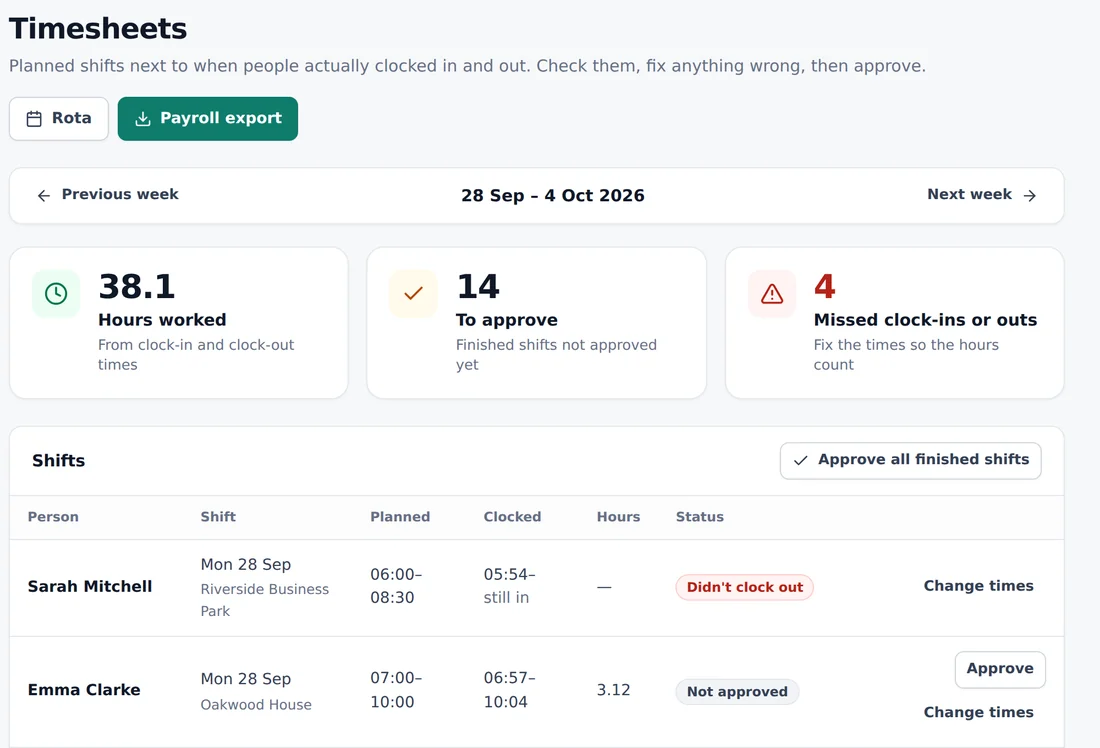
Each shift shows the planned times, the clock-in and clock-out times, and the hours.
Missed clock-ins flagged
Shifts where someone didn't clock in or out are counted at the top of the week so nothing slips through.
Change times
Fix a missed clock-out or a wrong time before you approve it.
Approve all at once
Approve one shift at a time or every finished shift in one go.
Payroll export
Download the approved hours for your payroll software or accountant.
Guaranteed hours
On the Assured plan, see who regularly works more than their contract guarantees.
From clock-in to payroll
Cleaners clock in and out on their phone against the shifts on the rota. The timesheet for the week then shows every shift with the planned times, the clocked times and the hours worked, with totals at the top for hours worked, shifts waiting for approval and missed clock-ins or outs.
You check the times, change anything that's wrong, and approve. Approve one shift at a time, or every finished shift in one go. Then download the approved hours for payroll.
Catch problems before pay day
Forgotten clock-outs are the most common timesheet problem in cleaning. RotaProof flags any shift where someone clocked in but not out, or didn't clock in at all, so you can fix it with the cleaner before the hours go to payroll.
Accurate times also help with the minimum wage. Paid time can include travelling between sites during the day, so the hours people actually work matter more than the hours on the rota.
Ready for the new rights on hours
The Employment Rights Act 2025 will give zero-hours and low-hours workers the right to an offer of guaranteed hours that reflect what they regularly work. On the Assured plan, RotaProof shows the hours each person regularly works, when an offer is due, and keeps a record of every offer.
Every change to a shift is also logged with the notice the cleaner got, ready for the coming rules on shift notice and cancellation pay.
Cleaning timesheet software: common questions
Does RotaProof run payroll?
No. It gives you approved hours to download for your payroll software or accountant. It doesn't calculate pay or tax.
What happens if a cleaner forgets to clock out?
The shift is flagged as a missed clock-out. You change the time, then approve it.
Can I approve lots of shifts at once?
Yes. Approve all finished shifts for the week in one go, or one at a time.
Where do the clock-in times come from?
Cleaners clock in and out from their personal link on their phone, against the shifts on the rota.
Which plan includes timesheets?
Clocking in and timesheets are on the Operations plan and above. You can try everything free for 30 days.
Worth reading
Timesheets and clocking in for cleaners
How to record cleaners' hours across several sites, what counts as paid time for the minimum wage, clocking in from a phone fairly, and what records to keep.
6 minute readGuaranteed hours for zero-hours cleaners
What the Employment Rights Act 2025 means for cleaners on zero-hours and low-hours contracts, what's still being decided, and what to do now.
6 minute readShift notice and cancellation pay for cleaning staff
The coming rights to reasonable notice of shifts and pay for short-notice cancellations, with cleaning examples and how to get ready.
See it with your kind of work
Open the demo to try the rota, clocking in and checks with made-up workers, or start your free trial.
Also see: cleaning company rota software · cleaner clock-in app · cleaning company invoicing software · right-to-work software for cleaning companies