A clock-in app for cleaners, with nothing to download
Each cleaner gets their own link. They open it on their phone, tap to clock in and out, and the times go straight onto the timesheet. No app store, no password, and it still works with no signal.
What makes it hard
Apps nobody installs
Getting every cleaner to download an app, create an account and remember a password is half the battle.
Basements and no signal
Plant rooms, basements and rural sites mean clocking in fails just when it matters.
Paper sheets and texts
Hours sent by text or written on a sheet are hard to check and slow to turn into payroll.
Built around how your work actually runs
Try everything free for 30 days, then pick the plan that fits.
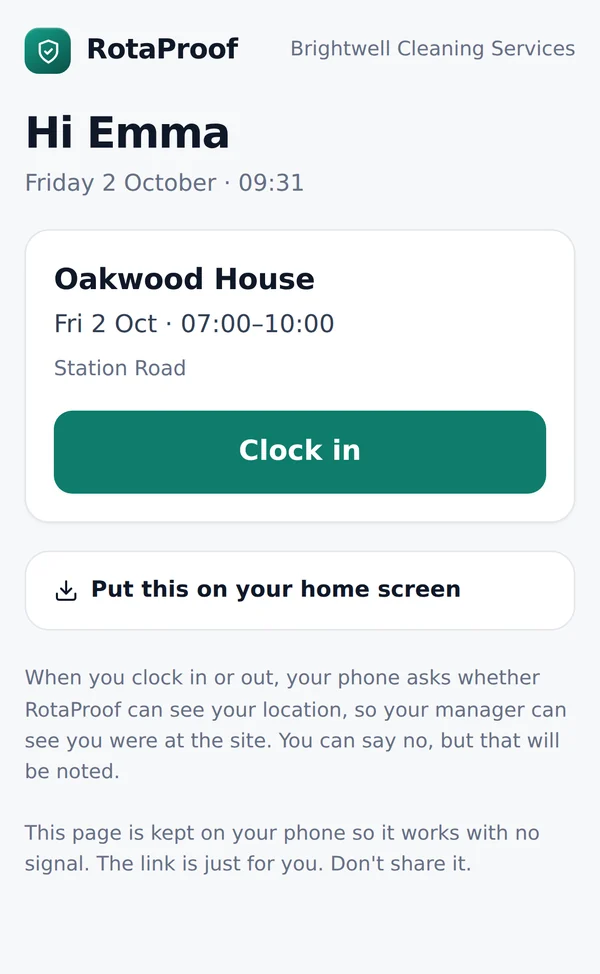
One tap to clock in
Today's shift, the site and a big Clock in button. That's the whole screen.
Put it on the home screen
Cleaners can add their link to their home screen, so it opens like an app.
Works with no signal
The page is kept on the phone and saves the times as soon as it's back online.
Location when they clock in
Their phone asks to share their location when they clock in or out. They can say no, and that's noted.
A private link each
Each cleaner has their own link. You can make a new one at any time if a phone is lost.
Straight onto the timesheet
Clock-in times appear next to the planned shift, ready to approve.
Why a link instead of an app
Cleaning teams change often, and many cleaners use older phones with little space. Asking everyone to download an app and set up a password slows you down every time someone starts. With RotaProof, you send each cleaner their personal link, for example by text or WhatsApp, or show it as a QR code to scan.
They open it, see their shift, and tap to clock in. They can add it to their home screen so it opens like any other app.
Built for the places cleaners work
Signal is often worst exactly where cleaners clock in: basements, plant rooms and the middle of large buildings. The clock-in page is kept on the phone, so it works with no signal and saves the times as soon as the phone is back online.
Cleaners can clock in shortly before their shift starts, so early arrivals are recorded properly.
Location, fairly
When a cleaner clocks in or out, their phone asks whether RotaProof can see their location, so you can see they were at the site. Location is only asked for at that moment, not tracked all day. Cleaners can say no, but that's noted, so you can ask about it.
The times go straight onto the timesheet next to the planned shift. Missed clock-ins and clock-outs are flagged, you fix them, approve the hours and download them for payroll.
Cleaner clock-in app: common questions
Do cleaners need to download anything?
No. They open their personal link on their phone. They can add it to their home screen if they like.
What if there's no signal on site?
It still works. The page is kept on the phone and saves the times as soon as the phone is back online.
Does it track cleaners' location all the time?
No. Location is only asked for at the moment a cleaner clocks in or out, and they can say no.
What if a cleaner loses their phone or shares the link?
Make a new link for them from their record. The old one stops working.
Which plan includes clocking in?
Clocking in and timesheets are on the Operations plan and above. You can try everything free for 30 days.
Worth reading
Timesheets and clocking in for cleaners
How to record cleaners' hours across several sites, what counts as paid time for the minimum wage, clocking in from a phone fairly, and what records to keep.
6 minute readHow to plan a cleaning staff rota
Build a weekly rota for a cleaning team from your sites up: spotting gaps and clashes, breaks and rest, cover for sickness, and a simple layout to start from.
6 minute readGuaranteed hours for zero-hours cleaners
What the Employment Rights Act 2025 means for cleaners on zero-hours and low-hours contracts, what's still being decided, and what to do now.
See it with your kind of work
Open the demo to try the rota, clocking in and checks with made-up workers, or start your free trial.
Also see: cleaning company rota software · cleaning timesheet software · cleaning company invoicing software · right-to-work software for cleaning companies