Invoicing that comes straight from your rota and timesheets
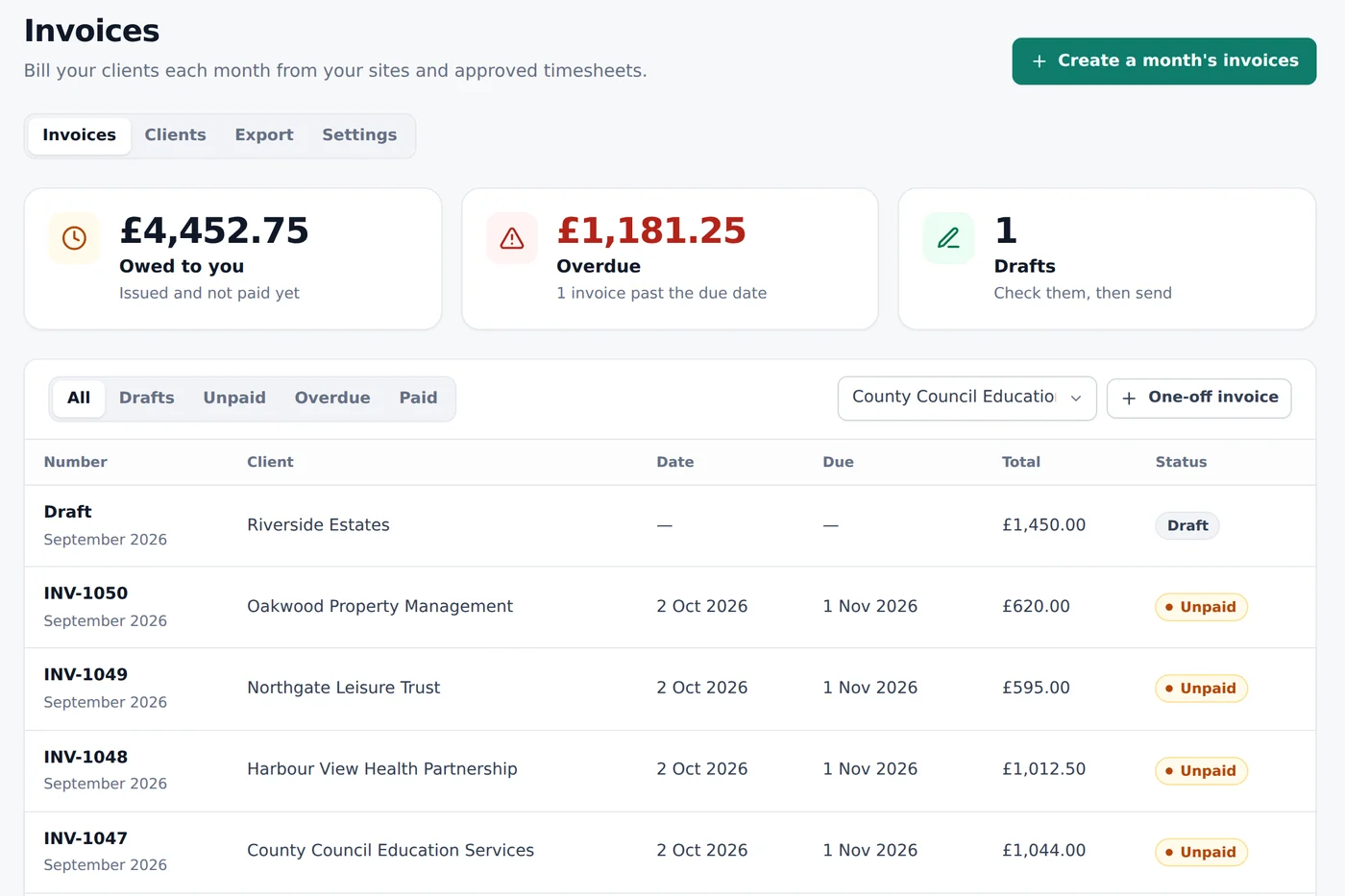
Set a price on each site, and RotaProof makes every client's invoice for the month from the visits that actually happened. Check the drafts, then send them as PDFs in a couple of clicks.
What makes it hard
Retyping the month
Every month starts with counting visits from the timesheets and typing them into Word, Excel or your accounts software.
Charging for missed visits
If a shift didn't happen, it shouldn't be on the invoice. Spotting that by hand is easy to get wrong.
Chasing payment
Knowing who owes what, and who's late, means another spreadsheet.
Built around how your work actually runs
Try everything free for 30 days, then pick the plan that fits.
A price on each site
A fixed monthly price, a price per visit or an hourly rate on the hours booked.
Drafts from approved visits
One draft per client, from shifts with approved hours. Missed and unapproved shifts are listed, not charged.
Sent as a PDF
Issue and email each invoice. Replies go to you, and your client can also view it online.
Proper UK invoices
Numbered in order, with VAT if you're registered, and credit notes for mistakes.
Quotes accepted online
Send a quote, let the client accept it online, then put the work on the rota in one click.
Into Xero or QuickBooks
Download issued invoices in a file your accounts software can import.
Start with a quote
Price a new contract in RotaProof: the regular visits, the price and any one-off work such as a first deep clean. It shows what the price comes to in a month, then sends the quote as a PDF with a link your client can use to accept it online. Their name, job title and the time they accepted are recorded.
When they accept, Start the work adds the client, the site with its price and the visits on the rota, so the contract flows straight into timesheets and invoices.
From the timesheet to the invoice
You set how each site is charged: a fixed price each month, a price per visit, or an hourly rate. At the end of the month, choose Create a month's invoices. RotaProof shows each client, the lines it will add and anything to check first, such as visits that haven't been approved on the timesheet yet.
Hourly sites are charged on the hours booked for the visits that happened, so clients pay for what they booked. Shifts nobody clocked in to aren't charged, and they're listed so you can check them.
Check, issue, send
Each client gets a draft. Change any line, add one-off work such as a deep clean, then issue it. Issuing gives it the next number and locks it, and emailing sends it as a PDF from your business name, with replies going to you. Your client can also open it online from a private link.
If you're VAT-registered, enter your VAT number and every invoice becomes a VAT invoice, with the VAT worked out for each rate. If you're not, no VAT is shown or charged. Mistakes are put right with a credit note, as HMRC expects, rather than by changing an invoice you've sent.
Knowing who's paid
Mark invoices as paid when the money arrives. The invoices page shows what you're owed and what's overdue, and overdue invoices appear on your home screen's to-do list.
At the end of the month, download your issued invoices and credit notes as a file for Xero or QuickBooks Online, so your accounts are up to date without typing anything twice.
Cleaning company invoicing software: common questions
Can clients accept a quote online?
Yes. The quote email has a private link where they can read the quote and accept it by typing their name and job title, or decline it.
Does RotaProof take card or Direct Debit payments?
Not yet. Invoices include your bank details for a transfer, and you mark them paid when the money arrives.
Can I invoice without using the rota?
Yes. Make a one-off invoice for any client and add the lines yourself. Monthly invoices from the rota need sites with a price set.
Does it work if I'm not VAT-registered?
Yes. Leave the VAT number empty and no VAT is shown or charged.
Does it connect to Xero or QuickBooks?
You download a file and import it into Xero or QuickBooks Online. There isn't a live connection yet.
Which plan includes quotes and invoicing?
Quotes and invoicing are on the Operations and Assured plans. You can try everything free for 30 days.
Worth reading
Timesheets and clocking in for cleaners
How to record cleaners' hours across several sites, what counts as paid time for the minimum wage, clocking in from a phone fairly, and what records to keep.
7 minute readHow much does cleaning company software cost? (UK, 2026)
What UK cleaning companies pay for rota and clocking-in software, with real prices for 20, 50 and 100 cleaners, plus the hidden costs.
6 minute readHow to plan a cleaning staff rota
Build a weekly rota for a cleaning team from your sites up: spotting gaps and clashes, breaks and rest, cover for sickness, and a simple layout to start from.
See it with your kind of work
Open the demo to try the rota, clocking in and checks with made-up workers, or start your free trial.
Also see: cleaning company rota software · cleaner clock-in app · cleaning timesheet software · right-to-work software for cleaning companies